How to hide related entities on a model driven app form

Updated: Feb 4
In a recent project I got the question how to hide related entity of an entity several times. So, here we go. New blog post.
This is actually something that Microsoft made easier with the new UI of the model driven app editor. And you do not need any scripting whatsoever. You just go the form in which you want to hide the related entities. You click on Related and on the right side you can select Hide as seen in the screenshot on the right side:

If you want to achieve the same in the old designer it gets a little more complicated. Occasionally the old designer fits my need better though. This is not one of them. However, in the old designer you do the following:
Select Navigation in the middle:
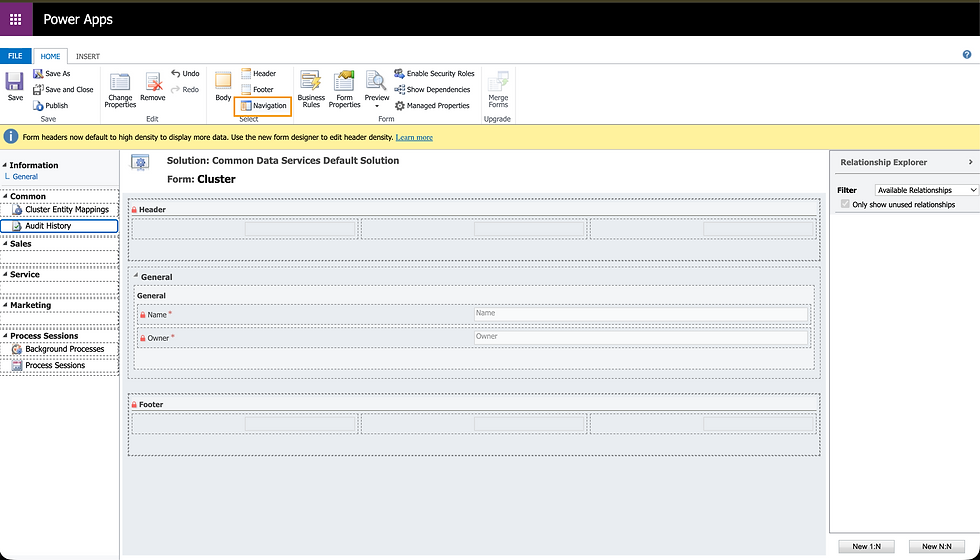
Select the field that you want to remove on the left side and click on Remove:

This will also hide the entity. You can select all related entitiy on the right side if you want to put them back on the form again.
By the way, if you want to unhide fields in the new designer, just activate the little toggle on the bottom of the page:

That's it. Easy peasy and no scripting needed.
🚀🚀🚀
If you have questions or are interested in starting a project together, feel free to book a meeting with me: Book time with Matthias Schmitz
🚀🚀🚀


Comments